IP Call Nurse Call System (IP-based network)

  • IP Call Nurse Call System (IP-based network)
  • IP Call Nurse Call System (IP-based network)
  • IP Call Nurse Call System (IP-based network)
  • IP Call Nurse Call System (IP-based network)
  • IP Call Nurse Call System (IP-based network)
  • IP Call Nurse Call System (IP-based network)
  • IP Call Nurse Call System (IP-based network)
  • IP Call Nurse Call System (IP-based network)
  • IP Call Nurse Call System (IP-based network)
  • IP Call Nurse Call System (IP-based network)
  • IP Call Nurse Call System (IP-based network)
Product details

IP Call nurse call system (IP-based network)

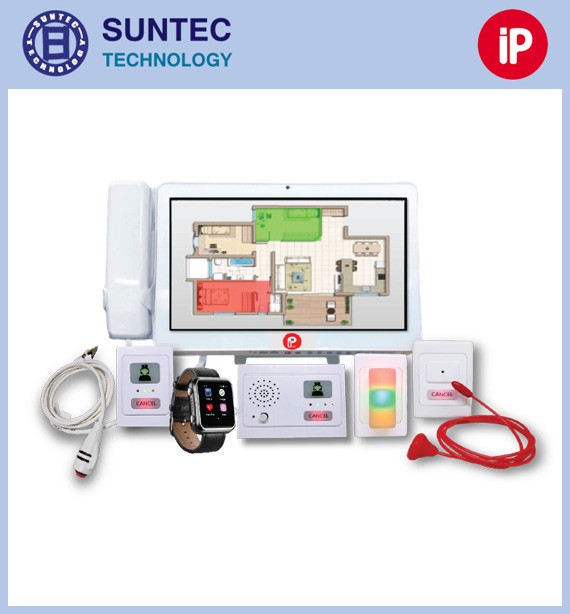
• The system can be programmed in many ways to suit the user, dividing calls into several types and priority levels, and accepting alerts from related equipment such as IV pumps, bed exit alarms and heart rate alarms

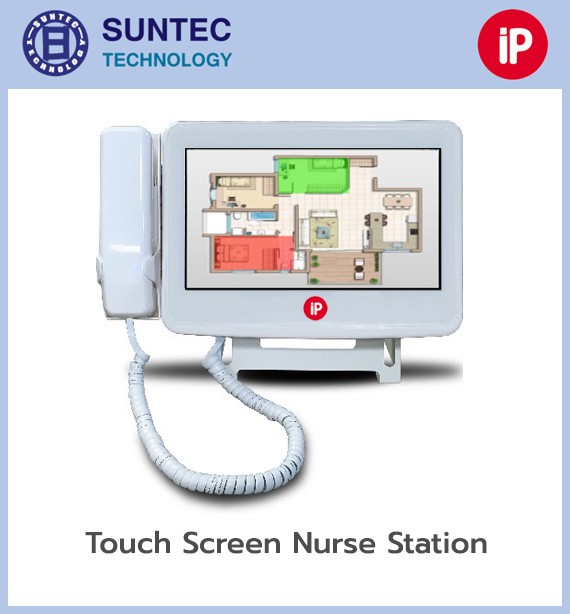
• The nurse station is a tablet touch screen with a handset for VoIP conversation, able to display both text and a graphical plan of the ward

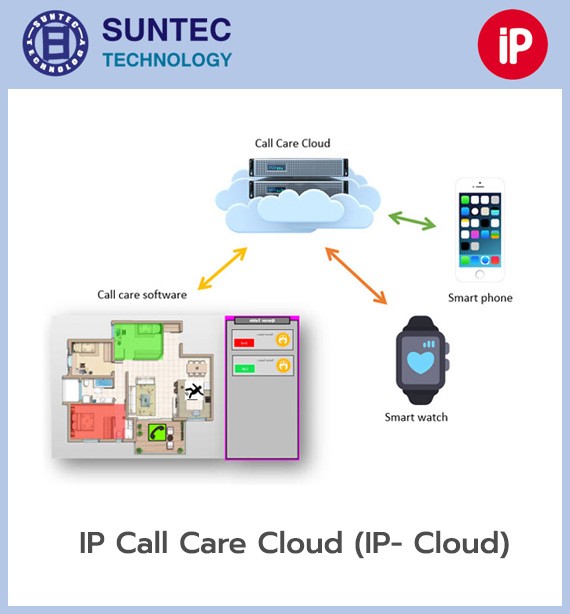
• Connection to external devices gives confidence that patients are looked after continuously and quickly, through communication devices such as IP phones, mobile phones and smart watches

The IP Call nurse call system is a hospital communication and alerting system running over an IP network. Each device exchanges data with the server directly, so it can identify the location, type of request, urgency and acknowledgement status precisely, rather than sending the simple on/off signal of a traditional system. It also records events and can connect to the hospital's information systems.

What the IP Call system does well

  • Sends and receives data in real time
  • Identifies the location and call type clearly
  • Supports VoIP voice conversation
  • Sends the call straight to the staff member responsible
  • Sets priority levels and automatic forwarding
  • Connects to mobile devices and IP telephones
  • Records data for later review
  • Analyses response times and working performance
  • Supports APIs and integration with hospital systems
  • Managed centrally
  • Divides permissions and areas of responsibility
  • Scales from a single ward to several buildings
  • Supports several hospitals under one central management system
  • New devices or functions can be added without changing the core architecture
  • Supports Smart Hospital and Digital Hospital strategies

How it works

  1. The patient presses a call button at the bed, in the bathroom or at a service point
  2. The device sends the data over the IP network to the central server
  3. The system identifies the room, bed, type of request and priority level
  4. The over-door light and the displays show the status immediately
  5. The system sends the alert to the nurse or team responsible
  6. Staff can acknowledge the call and speak to the patient through the audio system
  7. If nobody answers within the set time, the system forwards or escalates the alert
  8. When a staff member reaches the area, the system records the response time and the status of care
  9. All the data is stored for auditing and reporting

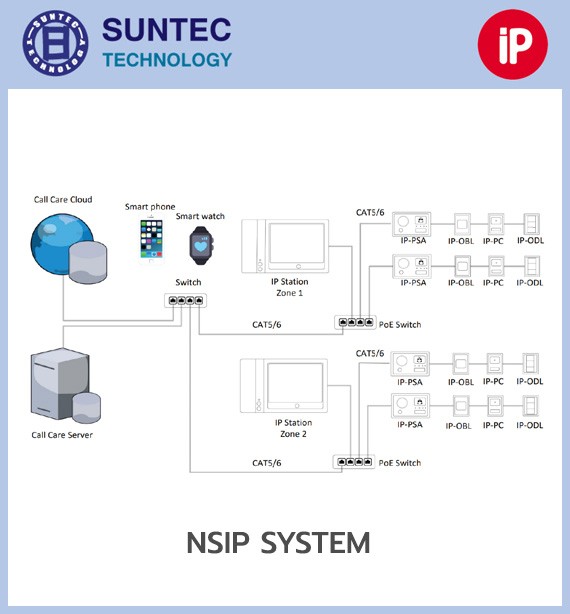
IP-based network architecture

1. Devices in the patient room

These include the patient station, handheld call buttons, bathroom pull cords, emergency buttons, Code Blue buttons and staff presence devices.

2. Room controller

Controls and collects the devices in a room or group of rooms and sends the data into the IP network. Each controller has its own device number so that the system can identify the location correctly.

3. IP network

Uses Ethernet and managed network switches to connect the parts of the system. A dedicated network or VLAN can be set aside for the nurse call system in line with IT department policy.

4. Nurse call server

The centre that processes calls, assigns priority, sends alerts, manages users, records events and connects to external systems. It can be installed on a physical or virtual server according to the system requirements.

Supported call types

The system can set the call type, colour, tone, priority and responsible staff for each call, for example:

  • Patient Call – the patient calls a nurse
  • Normal Call – a general call
  • Toilet Call – a call from the bathroom
  • Assistance Call – a request for help
  • Staff Assist – a staff member requests support
  • Emergency Call – an emergency
  • Code Blue – a medical emergency
  • Pain Assistance – a request for help with pain
  • Fall/Bed Exit Alarm – alerts on a patient at risk of falling out of bed
  • Equipment Alarm – an alarm from medical equipment
  • Cleaning/Housekeeping – a request for cleaning
  • Staff Presence – shows that a staff member is in the room
  • Cancel/Reset – cancels or resets a call

The system can route each type of request to the right person, so that a request for water goes to a nursing assistant, cleaning goes to housekeeping, and an emergency goes straight to a registered nurse or the medical team.

Main components

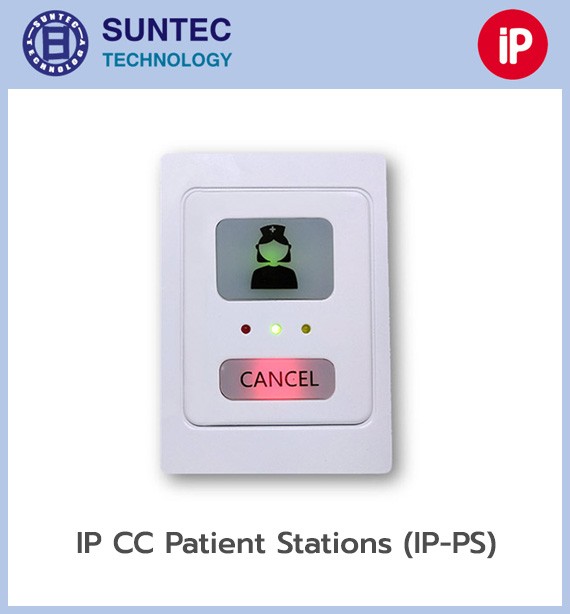
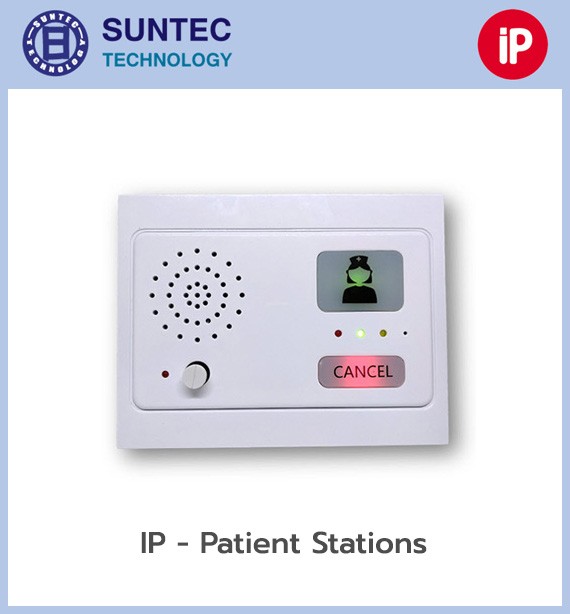
1. Patient station

Installed at the head of the bed or in the patient room, acting as the hub that receives signals from call buttons, bedside devices and medical equipment. It can support functions such as:

  • Nurse call
  • Emergency call
  • Call status display
  • Staff status display
  • Call cancellation
  • Handheld call button connection
  • Bed exit or external device connection
  • Voice communication on supported models

2. IP call point

A call button connected into the network that sends the location and call type to the server. Button colour, text, icon and function can be set to match the hospital's working process.

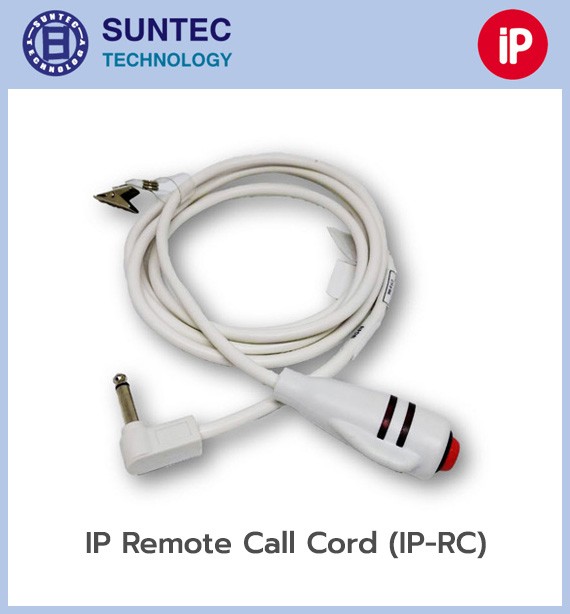
3. Handset or call pendant

A handheld call device for the patient, ranging from a basic call button to multi-button versions covering, for example:

  • Nurse call
  • Assistance to the bathroom
  • Reporting pain
  • Light on/off
  • Television control
  • Curtain or in-room device control

4. Pillow speaker

A bedside device combining call buttons and audio. The patient can talk to a nurse over VoIP directly, so the nurse knows the basic need before travelling to the room.

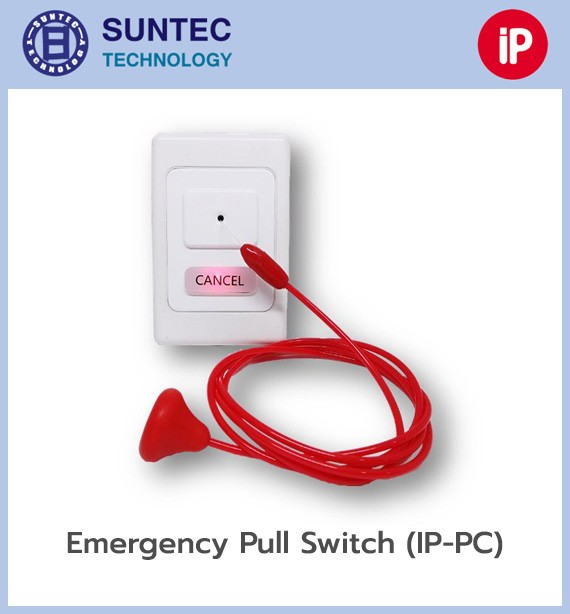
5. Toilet pull cord

A pull cord for bathrooms and showers, installed so that a patient can reach it standing, seated or after a fall. When pulled, the system shows it as a bathroom call with the priority level assigned to it.

6. Emergency and Code Blue call points

Used to call the emergency or resuscitation team. The tone, colour and light pattern can be set differently from ordinary calls, and the signal goes straight to the relevant team.

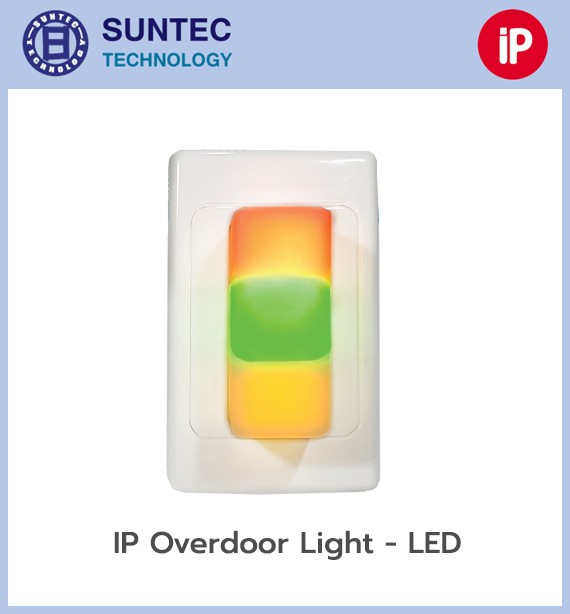
7. Corridor lamp

An over-door light showing the location and event type by colour or flash pattern, for example:

  • Red – emergency
  • Blue – Code Blue or a specific event
  • Yellow or white – general patient call
  • Green – a staff member is in the room

The actual colours depend on the standards and design of each project.

8. Annunciator display

A display in a corridor or common area showing real-time information such as:

  • Room and bed number
  • Patient name or code
  • Call type
  • Urgency level
  • Time waiting for a response
  • Staff status
  • Announcements or departmental information

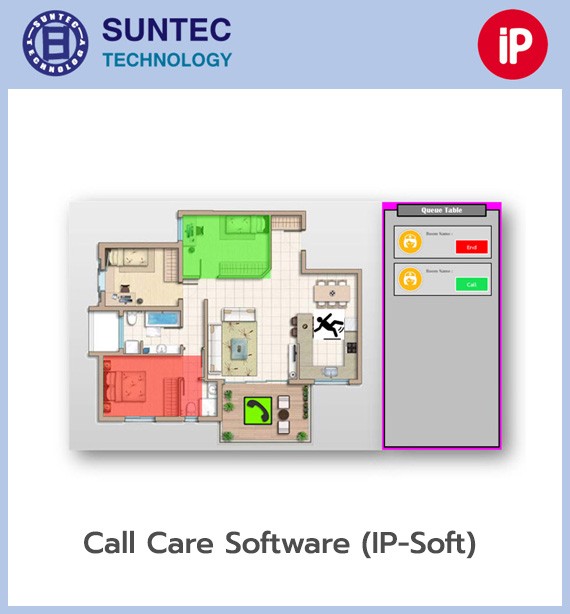
9. Touchscreen nurse station

The control screen at the nurse counter, used to view and manage calls within the area of responsibility. The functions that can be configured include:

  • Showing calls in priority order
  • Acknowledging and forwarding calls
  • Speaking to the patient
  • Calling a staff member or team
  • Showing room and bed status
  • Showing patient information
  • Setting follow-up reminders
  • Recording care activities
  • Requesting portering or cleaning
  • Reminders for rounds or medication

10. Server and central software

Controls, stores and processes all the system data, for example:

  • Managing devices and locations
  • Defining call types
  • Setting priority levels
  • Defining staff groups
  • Setting forwarding and escalation timings
  • Recording call history
  • Producing reports
  • Connecting to external systems
  • Monitoring device status and faults

The IP system can be installed on a physical or virtual server according to the product requirements and the hospital's IT policy.

11. Mobile application

Staff can receive and manage calls on a smartphone or tablet within a secure network, and can:

  • Receive alerts in real time
  • See the location and event type
  • Accept or decline a task
  • Forward a task to another staff member
  • Call back or talk over VoIP
  • Record their working status
  • Call for emergency help
  • Control some system functions remotely

How escalation works

The system can forward calls automatically, for example:

  1. Alert the nurse assigned to the bed
  2. If there is no answer, send it to the zone nurse
  3. Send it to the ward supervisor
  4. Send it to the backup team or a central department

Timings and escalation paths can be set separately by call type, time of day, shift, staff member or area, which reduces the risk of a call going unanswered.

VoIP voice communication

IP Call supports voice over the IP network, which means:

  • Patients can talk to a nurse directly
  • Nurses can ask what is needed before entering the room
  • Fewer unnecessary journeys
  • Less public address noise inside the hospital
  • Contact between the nurse station and patient rooms
  • Calls to connected IP phones or mobile devices

Connecting to hospital systems

The IP-based network can connect to other systems through APIs, web services, HL7 or interfaces supported by the product, for example:

HIS, EMR and EHR

  • Receiving patient data and bed numbers
  • Showing patient names on authorised screens
  • Receiving fall-risk, isolation or other important status flags
  • Sending care activity data back to the medical record
  • Reducing duplicate data entry

RTLS

A real-time location system makes it possible to:

  • Detect a staff member entering a room
  • Record staff presence automatically
  • Cancel a call without touching anything
  • Locate a staff member who has called for help
  • Track patients and equipment
  • Analyse the time staff spend in each room

Smart beds and bed exit

  • Receiving a signal when a patient gets out of bed
  • Checking bed rail status
  • Alerting on patients at risk of falling
  • Suppressing certain alerts while a staff member is in the room

Medical equipment

It can receive signals from equipment with a supported interface, such as:

  • Infusion pumps
  • Patient monitors
  • Ventilators
  • Telemetry
  • Medical gas alarms
  • Bed alarms

Communication systems

  • IP-PBX
  • IP telephones
  • Cordless telephones
  • Smartphones
  • Pagers
  • Messaging systems
  • Public address systems

Building and security systems

  • Building management system
  • Fire alarm
  • Security alarm
  • Panic alarm
  • Access control
  • Staff duress
  • Lighting, curtain, television and temperature control

Modern IP nurse call platforms can connect to RTLS, smart beds, EMR/EHR, infusion pumps, telemetry and building systems through an open API.

Reporting and data analysis

The system stores every event so that service can be audited and improved, for example:

  • Date and time the call started
  • Room and bed that called
  • Call type
  • Priority level
  • Time the staff member acknowledged it
  • Time they reached the patient
  • Time the event was closed
  • Number of times the call was forwarded
  • The staff member or team that answered
  • Calls that went unanswered
  • Average response time
  • Number of calls by room, ward, floor or building

The data can be used to analyse workload, plan staffing levels, reduce waiting times and audit the quality of patient care.

Recommended network design

The system should be designed as a managed network, separate from the general user network, for example:

  • A dedicated VLAN for nurse call
  • Managed network switches
  • Redundant core or distribution switches according to criticality
  • A UPS for the server, switches and critical equipment
  • QoS for voice and emergency traffic
  • Separated access rights through firewall and access control
  • Data backup and event logging
  • Continuous monitoring of system and device status
  • Network redundancy for critical areas
  • An IP address plan agreed with the hospital IT department

System security

Because IP Call is part of the IT infrastructure, it should have measures such as:

  • A separate network or VLAN
  • User rights limited by role
  • Appropriate passwords and account policies
  • Encrypted communication where the system supports it
  • Audit logging
  • Database backups
  • Software and security patch updates
  • Unnecessary ports and services closed
  • A plan for server or network failure
  • Periodic testing of the backup and alerting systems

Suitable for

  • Small, medium and large hospitals
  • Smart hospitals
  • ICU, CCU and emergency departments
  • Operating theatres and recovery rooms
  • General wards
  • Geriatric hospitals
  • Rehabilitation centres and long-term care facilities
  • Buildings that need several floors or wards linked together
  • Hospital groups that want central management

In short, the IP Call nurse call system does more than pass on a request for help. It is a clinical communication platform linking patients, nurses, medical equipment and information systems, so that staff get the right information where they need it, response times fall, safety improves, and the hospital has a structured path towards becoming a Smart Hospital.

Talk to our engineers directly

Specialist engineers with more than 20 years of experience

We have long designed and installed nurse call systems, fire alarm systems
and lightning protection systems for both private companies and government agencies.

Frequently Asked Questions

The nurse station is a tablet touch screen with a handset for VOIP conversations, showing both text and a graphical plan of the ward.

It accepts alerts from related devices such as IV pumps, bed exit alarms and heart rate alarms, so that patients are cared for without a break.

Yes. The system can be programmed in many ways to suit the user, dividing calls into multiple types and multiple priority levels.

logo